Getting a Netflix download on Huawei is now really quick with three methods that you can use. Having Netflix on Huawei devices can be experienced by maximizing the innovations that the company has provided to ensure that you get the best entertainment possible on your mobile. With just a simple setup, you can use Netflix to binge-watch your favorite movies, shows, and Netflix originals with a tap on the title. How is Netflix currently installed on Huawei? Which sources ensure a safe installation, and how should one obtain the app? You can find out more about the whole process as you read this article.
How to Install Netflix on Huawei Smartphones?
Via APK Download
Getting Netflix on Huawei is possible with the use of Petal Search. It is a useful search app that is preinstalled in newer Huawei mobile devices. You can use the search widget and type either Netflix or Netflix download huawei to look for possible APKs that you can use to install the Netflix app on your mobile phone or tablet. You should keep in mind, though, that not every APK is safe to download. To obtain a secure APK version of Netflix, you must have a sharp eye for the best and most reliable sources. It is recommended that you only use the APK from the Netflix website through your Petal Search to ensure the protection of your personal data without any risks.
Via GBox
Another way to get Netflix is through the use of GBox. GBox is short for Google Box, a virtual environment created to replicate Google Play Services on Huawei devices. GBox makes it possible for a Huawei device to have Google Services inside its own Huawei environment. You can download GBox from the developer of the app by typing gboxlab on Huawei Browser. This browser comes preinstalled on your Huawei device. When you are in GBoxLab, you can search for the file you can download to install GBox. After installation, you can type in your Google account details in order to access Google Play so that you will be able to download Netflix on your mobile device.
Via AppGallery
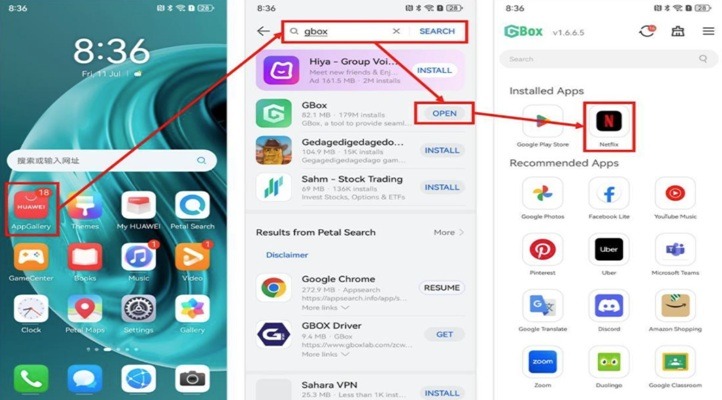
This is actually an alternative to downloading GBox. Instead of going to the GBoxLab website, you can go directly to Huawei AppGallery to download the GBox app. You can do this by going to AppGallery and typing “gbox” in the search bar. The search results will come up and reveal the Install button. You can select it to download the file. AppGallery is a trusted source of all possible apps that you can use on your Huawei device. It implements several security measures to guarantee safe downloads and installations. After downloading GBox, you can go to your Google account using GBox and install the Google Play Store. In the Google Play Store, you will be able to find the Netflix installer for your personal download.
Conclusion
If you have a Huawei smartphone or tablet, you may view movies, shows, and other kinds of videos whenever you want through Netflix. It is still best to get installers from AppGallery instead of other unreliable sources. Through the GBox app, a Netflix download for Huawei will subsequently be an easy step for users. When you download installation files, you should go directly to the website of the developer instead of taking risks installing a file from any source that comes up. After installation, you may opt to restart your device to avoid any errors in loading the app. Watching Netflix on Huawei is now really possible with the help of these setup methods.